


My Highmark
3.8620.00 Reviews
App Specs
- Version
- 1.92.0-playstore
- Updated On
- License
- Free
- Downloads
- 100,000+
- Developer
- Highmark Inc.
- Categories
- Medical
- Platform
- Android, iOS
Screenshots
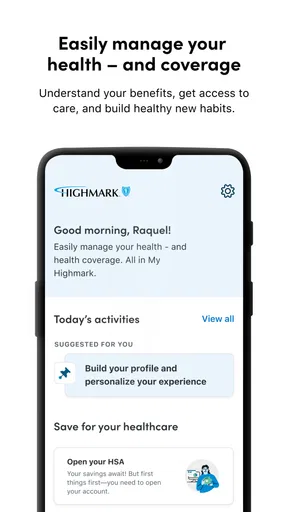
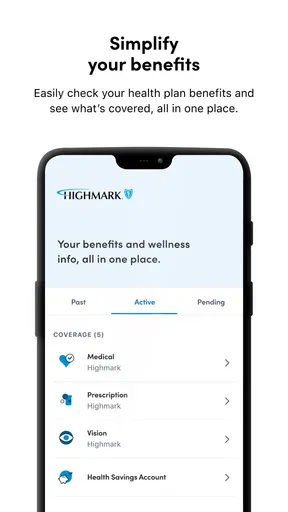
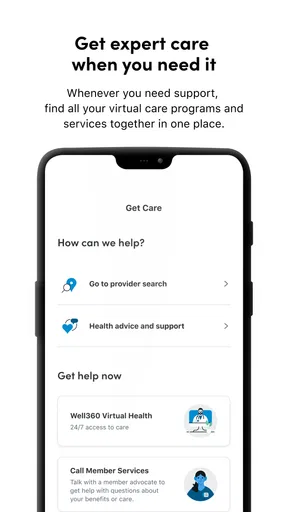
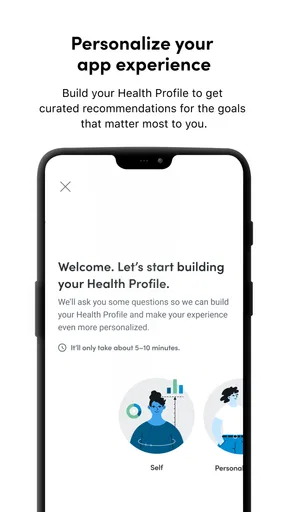
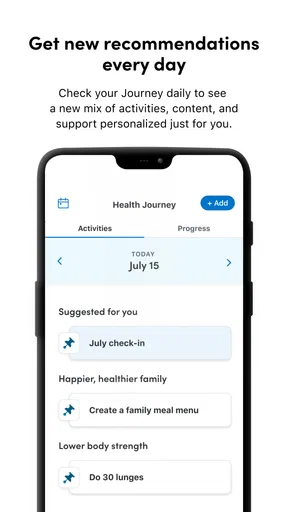
 Analysis by AppCompare
I look at My Highmark as a health-benefits companion rather than a substitute for a doctor, an insurer’s full website, or a general money-management tool. That distinction matters: it is most useful when you already deal with Highmark and want a practical place to check benefit-related details, not when you need a broad medical record or a complete household budget. For people who find insurance paperwork difficult to keep straight, bringing routine account tasks into one app can reduce the number of places they need to search.
Because health coverage can affect appointments, claims, and household planning, ease of access is more than a cosmetic concern. I pay attention to whether an app makes its purpose understandable, whether its layout feels manageable, and whether someone can use it in different settings without having to rush. My Highmark is a free medical app from Highmark Inc. It has an Everyone content rating, a 3.8 average from around 4,600 ratings, and more than 100,000 installs. Those figures suggest it has found an audience, but the right fit still depends on your coverage and how you prefer to handle benefits.
Using My Highmark in everyday life
I find it helpful to treat a benefits app as a place to prepare for a question, not necessarily to settle every question on the spot. In this section, I’ll focus on fitting a quick check into ordinary routines while leaving time to read carefully and protect account privacy. That practical approach leads naturally to how the app’s layout affects readability and navigation.
Readability and finding the right place
For a benefits app, a clear starting point is especially valuable: people often open one because they have a specific question, not because they want to browse. My Highmark is intended to gather health and benefit-related account information, so its strongest potential role is to give a member a more direct route to routine details than searching through saved documents or starting from a general insurer website. I would approach the layout task by task: identify the section connected to the question at hand, then check that the information belongs to the right member or account before relying on it.
That last step is a useful habit even when an interface feels straightforward. Insurance terms can look similar while referring to different things, and a quick glance at a heading is not always enough to understand what a claim or benefit entry means. I would read the surrounding labels rather than acting on a single number or status in isolation. In practice, a calm, deliberate visit is better than trying to interpret an unfamiliar benefits screen while walking into an appointment.
People who are comfortable with mobile apps may appreciate having a familiar screen for recurring account checks. Someone who rarely uses a smartphone, struggles with small text, or prefers to compare several documents side by side may find a desktop browser or printed explanation easier. I would not assume that an app is automatically the simplest format for everyone. A useful test is whether you can locate the one item you need without feeling hurried; if not, another channel may suit you better.
Motor, sensory, and cognitive considerations
Health and insurance tasks can be tiring even before a person opens an app. Pain, fatigue, temporary illness, low vision, reduced dexterity, or difficulty concentrating can all change what “easy to use” means from one day to the next. For that reason, I would treat My Highmark as a tool to use at your own pace. When the task is not urgent, sit somewhere steady, enlarge text using your device’s usual display settings if that helps, and avoid trying to complete a multi-step account task with one hand while carrying bags or handling mobility equipment.
Worth Reading Before You Choose

EA SPORTS FC Mobile 26 Is a Bigger Football Game, but It Takes Time

Flipboard Shows What News Apps Must Do Beyond the Feed

Switching to Android Auto Means Rethinking Your Driving Routine

Google Calendar Makes a Crowded Week Easier to Manage

Ludo King Makes the Most of the Minutes Between Plans

Baby Panda World Brings Quick Play to Modern Phones, but Its Game Library Feels Busy
For motor access, the practical question is whether the actions you need can be completed comfortably on your device. If tapping small controls is difficult, try holding the phone with both hands or using a supported position rather than balancing it in your lap. A family member or trusted helper may also assist with navigation, but account and health information is sensitive. I would keep the member in control of sign-in and decisions, and avoid sharing credentials casually or leaving a signed-in phone unattended.
Sensory needs call for a similar, realistic approach. A bright waiting room, glare, background noise, or a distracting commute can make it harder to read and understand benefit information. If you use screen magnification, a screen reader, captions, or other device-level tools, check how the app works with your own settings before depending on it for a time-sensitive task. That is not a claim about a particular accessibility certification or feature; it is simply a sensible way to find out whether the combination of your device and the app works for you.
When access needs to fit the moment
A realistic use case is checking a benefit detail before calling a provider or discussing an appointment with a family member. I would open the app while seated, confirm that I am looking at the correct account, and note the wording I want clarified. If the detail is ambiguous, I would use it as a starting point for a conversation rather than treating a screen as a final medical or coverage decision. Keeping a short note of the question can prevent a rushed call from turning into a second round of searching later.
Another helpful routine is to review benefit information before it becomes urgent. For example, if you are organizing paperwork for an upcoming visit, checking your account in advance gives you time to understand what is displayed and to ask the insurer or provider about anything unclear. This is more useful than opening an app for the first time in a crowded reception area. I also recommend checking whether the information you see is current before making plans; account screens are convenient, but the situation behind a claim or benefit can still require confirmation through the appropriate channel.
Mobile access has a clear trade-off. A phone is usually nearby, so it can be convenient for a quick check away from home, but a smaller screen can make dense details harder to compare. A browser on a computer may be better when you want to read carefully, keep several documents open, or type a longer message. Paper can be preferable for someone who wants to mark up notes or avoid doing account tasks on a phone. I see the app as one useful route, not a reason to abandon whichever format helps you understand your coverage best.
Where the convenience has limits
My Highmark is tied to Highmark health and benefits, so its usefulness depends on your relationship with the company and the information available to your account. It is not the obvious choice for someone looking for a provider-neutral health organizer, an all-purpose medical record, or a way to manage insurance from unrelated companies in one place. A general health app may better match someone who wants a broad personal log, while an insurer’s website or a direct conversation may be more suitable for a complicated coverage question.
There is also a difference between seeing an account detail and understanding what it means. Claims and benefit language can involve timing, eligibility, or context that a quick screen cannot resolve on its own. I would not use any single app view as a replacement for carefully reading official plan materials or confirming an uncertain decision. If the question could affect care or a substantial expense, take the time to seek clarification rather than guessing from a brief label.
Mobile access also brings ordinary practical friction. A device may be unavailable, its battery may be low, or a person may not feel comfortable handling health information on a shared phone. Someone helping a relative needs to think about privacy as well as convenience; it is better to let the account holder participate and decide what to share. If these situations are common for you, keeping essential contact information or relevant paperwork in a secure, accessible place can complement the app rather than relying on one device alone.
My Highmark’s current version is 1.88.0-playstore, and it requires Android 8.1 or later. That makes checking your device’s operating-system version a practical first step if you are considering installing it on an older phone. The app is free, but a free download does not by itself answer whether every task you need is available for your specific plan or account. I would install it when there is a concrete benefit to having account access on mobile, then judge it by whether it helps with those actual tasks.
A measured recommendation for different users
I would recommend trying My Highmark if you are a Highmark member who prefers to handle routine benefit checks on a phone and is comfortable reviewing personal account information digitally. It may be particularly handy for someone who wants a single mobile starting point before asking a more detailed question. It is less compelling if you do not use Highmark, if you need a full medical record across providers, or if you find phone screens stressful and already manage your paperwork more confidently elsewhere.
Before relying on it for an important task, I would test the basic workflow at a quiet moment: sign in, locate the information you expect to use, and see whether the labels make sense to you. If you share responsibility for a family member’s care, agree on who will access the account and how you will protect private details. These small decisions make a benefits app more useful without assuming that every person has the same comfort level, device, or support network.
As an app from Highmark Inc. in the medical category, My Highmark has a focused purpose: help members engage with their health benefits through a mobile account. It is free to download, rated for Everyone, and has been available since December 21, 2022. I would treat its 3.8 average as one broad signal rather than a guarantee of how it will work for your particular account or accessibility needs. Your own ability to complete the tasks you care about is the more meaningful measure.
Getting Started with My Highmark
First things first, downloading My Highmark is a breeze. Head over to your app store, and it's just a tap away. The installation is quick, and before you know it, you're ready to set things up. The initial setup is surprisingly straightforward. You sign up, fill in your details, and within minutes, your dashboard is ready. Simple, right?
The interface is clean and intuitive. Even if you're not the most tech-savvy person, navigating through My Highmark feels like a walk in the park. The main menu is well-organized, with all the essential categories laid out clearly. No need to hunt for what you need, everything is just a tap away.
Features That Stand Out
Now, let's talk about the features because that’s where the magic happens. One of the standout features of My Highmark is its ability to consolidate all your insurance and financial accounts in one place. You can view your health insurance details, check your claims, and even pay your premiums directly through the app. It's like having a personal financial assistant in your pocket.
Another cool feature is the notifications. The app sends timely reminders for due payments and policy renewals, ensuring you’re always on top of your game. No more late fees or missed renewals. That’s a win in my book.
But wait, there’s more! The app also includes a handy tool for tracking your expenses. It's a great way to keep an eye on your spending habits and make adjustments as needed. Trust me, your future self will thank you for this!
User Experience: Smooth Sailing or Choppy Waters?
In terms of user experience, I found My Highmark to be pretty solid. The app runs smoothly, with minimal lag, and transitions between screens are seamless. Whether you're browsing policies or checking recent transactions, everything feels quick and responsive.
However, like any app, it's not without its quirks. I did notice that sometimes the app takes a little extra time to load certain data-heavy pages. It’s not a deal-breaker, but something to keep in mind if you’re in a hurry.
If you ever find yourself stuck, their customer support is just a tap away. They offer live chat support within the app, which is a nice touch. I gave it a try, and the response time was impressively quick. So, points for that!
Is It Worth Your Time?
So, the million-dollar question: is My Highmark worth downloading? If you’re someone who likes having all your insurance and financial details neatly organized in one place, then absolutely. The app is packed with features designed to make your life easier, and it does a pretty good job at it.
Sure, there might be a few hiccups here and there, but overall, the positives far outweigh the negatives. It’s convenient, efficient, and, most importantly, user-friendly. Plus, with the added security features, you can rest easy knowing your data is protected.
In conclusion, My Highmark is definitely worth giving a shot. Whether you’re managing multiple insurance policies or just looking for a smarter way to handle your finances, this app has got you covered. So, go ahead, download it, and take control of your financial future!
Pros
- User-friendly interface for easy navigation.
- Comprehensive health tracking features.
- Seamless integration with wearables.
- Customizable notifications for health updates.
- Secure data storage and privacy protection.
Cons
- Limited features in the free version.
- Occasional syncing issues with devices.
- Requires constant internet connection.
- Some features are region-specific.
- No offline mode for data access.
FAQs for My Highmark
What is My Highmark and what does it offer?
My Highmark is a comprehensive app designed to provide users with personalized health and wellness resources. It offers features like health tracking, access to medical records, appointment scheduling, and wellness tips. The app aims to enhance health management by simplifying access to important health information and resources.
Is My Highmark available for both Android and iOS?
Yes, My Highmark is available for download on both Android and iOS platforms. Users can easily find it on the Google Play Store for Android devices and the Apple App Store for iOS devices, ensuring a wide accessibility for different smartphone users.
How secure is my personal information on My Highmark?
My Highmark prioritizes user privacy and employs robust security measures to protect personal information. The app uses encryption and secure servers to safeguard data. Users are encouraged to enable additional security features like two-factor authentication for enhanced protection of their health information.
Can I use My Highmark to schedule doctor appointments?
Yes, one of the key features of My Highmark is the ability to schedule doctor appointments directly through the app. Users can view available slots, select preferred times, and receive reminders, making healthcare management more convenient and efficient.
Are there costs associated with using My Highmark?
My Highmark is generally free to download and use, providing a range of basic features at no cost. However, some advanced features or premium services may require a subscription or one-time payment. Users should check the app details for any potential charges before downloading.


